Files and Data Exchange
Automata Lab uses one canonical JSON project format for complete project round trips and CSV for transferring individual collections. JSON Open and Save replace or preserve the whole authoring project; CSV import and export affect only the selected collection.
Automata Lab JSON Files
An Automata Lab project is a UTF-8 JSON object with these required top-level members:
| Member | Content |
|---|---|
file_id | Exact product identity automata-lab-state-machine. |
file_version | Supported file-format version 1.0.0, 1.1.0, 1.2.0, 1.3.0, or 1.4.0. |
settings | Portable model name, description, and model version. |
state_machine | States, events, actions, ordered state actions, initial state, and transitions. |
chart | Persisted Chart settings, placement, indicators, relations, and drafts. |
solver | Saved Solver observation sequences. |
simulator | Saved Simulator event sequences. |
The reader is strict. It rejects malformed JSON, duplicate object members, unknown properties, unsupported versions, invalid types, non-finite numbers, duplicate identifiers or transition keys, dangling references, and exceeded limits. A failed Open leaves the current project and its history unchanged and records an actionable diagnostic in Console.
Routes, label positions, sides, lanes, gravity points, viewports, selection, Console entries, hosted state, live sessions, traces, and transient Solver candidates are not project-file content.
File-Version and Model-Version Differences
file_version identifies the JSON contract. The reader accepts strict versions 1.0.0 through 1.4.0. Every canonical Save writes 1.4.0, including an explicit terminal_state boolean on every state. Earlier versions reject that new field. Older applications that support only files through 1.3.0 cannot open newly saved projects.
When opening an older file, configured state-to-terminal relations become true state flags. Shared indicators mark every connected state. Orphan indicators, direct initial-to-terminal links and unfinished drafts do not mark states. For 1.4.0, explicit flags govern notation: a missing relation for a true flag is created; a conflicting relation for a false flag is removed while its indicator is retained. Invalid references still reject the entire file. Console reports migration or notation repair once.
State and indicator attachments, direct indicator connections, remembered events, and restoration positions survive Save/Open. Opening a file never completes a draft automatically. Older applications cannot open versions they do not support; they do not silently discard the additional data. Legacy free coordinates remain free when opened. Terminal stopping applies only when enabled for a new or reset Simulator execution.
settings.version is the model version you edit on Editor → State Machine. It is a Semantic Versioning value such as 1.2.0 and describes your model, not the application or JSON schema. Changing the model version does not convert the file format.
The application also has its own release version, shown in the title bar and About dialog. These three versions answer different questions:
| Version | Meaning |
|---|---|
| File version | Which JSON contract encodes the project. |
| Model version | Which release of your authored state machine the metadata describes. |
| Application version | Which Automata Lab release is running. |
Terminal-State Example
Download the current terminal-state light-switch example. It uses file 1.4.0 and marks only state_fuse_blown terminal. The repository's examples/state-machine-light-switch.json remains a 1.0.0 migration example and the bundled server model; opening it produces the same terminal flags from its configured relation. Enable terminal execution before Start Session or Reset to stop at the blown fuse. With it disabled, normal event processing continues.
Complete and Incomplete Projects
A structurally and referentially sound authoring project may be saved and reopened with no states and/or no initial state. These are incomplete-project warnings rather than file-integrity failures.
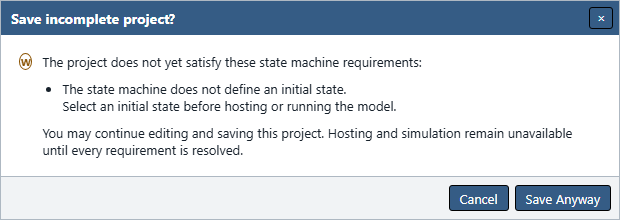
Before Save writes such a project, Save incomplete project? lists every missing requirement and explains that hosting and execution remain unavailable. Save Anyway writes canonical states: [] and/or initial_state: null; Cancel writes nothing. After a successful write, Console records one warning for each missing condition.
Figure UG-23 shows the warning after clearing only the example's Initial State selection.
Open accepts those same incomplete conditions. After replacing the project, Incomplete project opened lists the requirements and Console records matching warnings. Other defects—including malformed structure, duplicate names, dangling references, invalid metadata, and capacity violations—remain blocking and never partially replace the current project.
Push, Pull's hosted-document boundary, compilation, hosting, and Simulator sessions require a complete valid model even though ordinary editing, Save, Open, and Solver work can continue with an incomplete draft.
New, Open, Save, and Save As
Automata Lab is a single-document application. Save and Save As remain available whenever a project is open. Each command checks the project before asking for a destination or writing a file. If an integrity problem prevents saving, Automata Lab explains what needs correcting and writes nothing. Missing states or an initial state alone use the incomplete-project warning described above.
- File → New starts a fresh untitled authoring project.
- File → Open reads and transactionally validates one JSON project before replacing the current project.
- File → Save writes the current persistable project to its associated destination when one is available.
- File → Save As requests one new JSON destination and associates a successful capable-browser save with it.
- File → Close clears the client project only; it does not delete a local file or hosted server snapshot.
New, Open, Pull, and Close protect dirty work with Save and Continue, Discard and Continue, and Cancel choices where applicable. Cancellation or a failed precondition leaves the project, Undo/Redo history, Solver candidate, and hosted model unchanged.
A successful Open establishes a clean revision-1 project and clears prior document history and transient candidates. Ordinary Save and Save As do not increment the document revision. Defensive terminal-notation repair, if needed, commits one undoable revision before confirmation or destination selection; cancelling the save retains that repair as dirty work.
Optional Save Backups
Application Settings → General → File Saving → Save Backup defaults to off. When enabled and the active file adapter can update a sibling file without another prompt, Save preserves the previous JSON bytes as a sibling .json.bak before replacing the current file.
If the browser cannot create that sibling silently, Automata Lab skips the backup, writes or downloads the current JSON exactly once, and records FILE_BACKUP_SKIPPED in Console. It does not open a folder picker, perform a second backup download, or interrupt the save with another warning dialog.
Save As never backs up the old association. It performs one destination interaction for the new current project.
Canonical JSON Output
Save writes one deterministic representation:
- UTF-8 JSON with two-space indentation and one trailing newline;
- schema-defined property order;
- preserved declaration, transition, action-assignment, and saved-sequence order;
- top-left Chart state coordinates and current canonical Chart compatibility fields; and
- explicit empty arrays for canonical collections where the file contract requires them.
Canonical output makes equivalent saved content stable for comparison and hashing. It does not include application preferences such as theme, Chart sizes, image export, Page Setup, Print style, server URL, or Console layout.
Opening an earlier conforming 1.0.0 Chart can convert optional legacy placement members without visible movement. Save then emits the canonical representation. Unsupported fields are not silently repaired; for example, /chart/transition_anchors is rejected as unknown.
CSV Collection Types
Use File → Import from CSV or File → Export to CSV with an open project. Each command transfers one collection and does not Open, replace, or Save the JSON project.
| Collection | Canonical columns | Result |
|---|---|---|
| Model Metadata | name,description,version,initial_state | One metadata record and semantic initial state. |
| States | name,description,terminal_state | State declarations. |
| Events | name,description | Event declarations. |
| Actions | name,description | Action declarations. |
| State Actions | state,action,schedule | Ordered Entry or Exit assignments. |
| Transition Table | state,event,next_state | Deterministic transition rows. |
| Solver Observation Sequence | name,type | One named typed Solver sequence. |
| Simulator Event Sequence | name | One named ordered event sequence. |
CSV input is UTF-8 and supports quoted fields and embedded newlines. Header matching ignores case and surrounding whitespace, and unknown columns are ignored. Export uses the canonical columns in current display order, RFC 4180 field escaping, CRLF records, and one final CRLF.
Model Metadata import uses only the first non-empty data row. Extra rows do not block a valid first row, but a dialog and Console warning disclose that they were ignored. A blank initial_state clears initialization. Model Metadata export always writes exactly one data row.
If State Actions omits the entire schedule column, imported rows default to Entry. When the column is present, each value must normalize to entry or exit; blank or unsupported values reject the complete import.
States CSV exports explicit true/false values in terminal_state. On import, this column is optional: if absent, an overwritten state keeps its flag and a new state defaults false. If present, only true/false after case and whitespace normalization is accepted; blank or invalid cells reject the whole import. Flag and notation changes commit together in one undoable import.
CSV Import Validation
Automata Lab parses and validates the complete pending import before changing the project. It checks every applicable row, reference, duplicate key, and resulting capacity. Model Metadata uses only its first non-empty data row, as described above. An invalid applicable row rejects the whole import, leaves the document and history unchanged, opens an error summary, and writes the first 100 ordered diagnostics plus an omission summary when necessary.
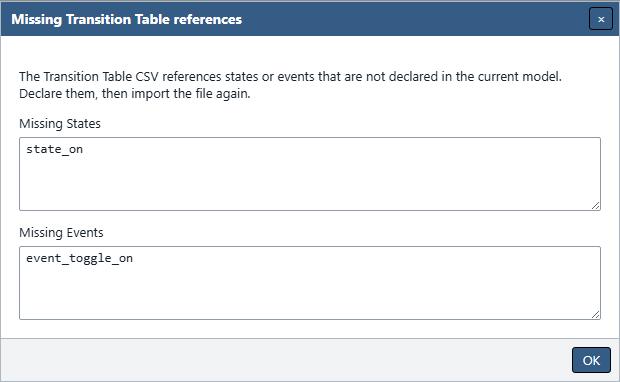
Transition Table files that reference undeclared names show copyable Missing States and Missing Events lists in first-appearance order. No transition row is applied until all references are valid.
Solver sequence type values must be event, state, or action. The matching canonical prefix is added when absent, retained when it agrees, and rejected when it conflicts. Simulator sequence import deliberately accepts undeclared event names for negative runtime testing.
Figure UG-24 shows an import into a working copy missing state_on and event_toggle_on. The source CSV was exported from the original light-switch example.
Collision and Overwrite Handling
When every imported row is valid but keys already exist, one CSV Import Conflict dialog summarizes the complete pending overwrite. Confirming Overwrite applies all replacements and additions as one Undo entry; Cancel changes nothing.
Named entities replace the matching entity in place. Transition conflicts replace the destination for the existing state-and-event key. Non-conflicting rows append in CSV order, and State Actions preserve duplicates and row order.
Solver and Simulator imports first request the destination sequence name. An existing name uses the same one-confirmation atomic-overwrite rule. The application never commits a prefix of a CSV file before asking about later failures or collisions.
Browser Download Fallbacks
A browser with the File System Access API uses one native Save As picker with a suggested .json name and JSON filter. Later Save operations can reuse the associated handle. CSV and Chart image exports similarly use one format-appropriate save picker.
When that optional API is unavailable, Save and Save As each produce one explicit current-project download. Export commands also download their result with the suggested name. The browser controls the download location, and contextual status explains when Automata Lab cannot retain or reveal it.
Cancellation is not an error. It leaves project content, dirty state, revision, history, file association, Console, and hosted state unchanged unless the operation had already completed before a browser-owned download prompt.
Capacity Limits
Limits keep file parsing, validation, workers, and rendering bounded. Important project and exchange limits are:
| Data | Maximum |
|---|---|
| JSON or CSV input file | 5 MiB |
| Name | 128 Unicode code points |
| Description | 4,096 Unicode code points |
| States | 10,000 |
| Events | 256 |
| Actions | 1,000 |
| Transitions | 50,000 |
| Entry action assignments | 50,000 |
| Exit action assignments | 50,000 |
| Terminal indicators, terminal relations, or Chart drafts | 10,000 each |
| Solver sequences | 1,000 |
| Solver tokens across the sequence library | 50,000 |
| Simulator sequences | 1,000 |
| Events in one Simulator sequence | 10,000 |
An import is evaluated against the resulting merged project, not only the number of rows in the incoming file. Exceeding a limit rejects the complete operation without partial mutation.
Previous: Simulator
Next: Printing and Export