Server and Revisions
Automata Lab includes a browser-local server worker that owns one immutable hosted project and the Simulator sessions pinned to it. The client authoring project and hosted project are separate: normal editing, Open, Save, Chart commands, and Solver Apply change only the client until you explicitly Push.
Built-in Server
The default Server URL is builtin://server. At application startup, the built-in worker validates and hosts the bundled light-switch example, establishes its semantic revision, and reports readiness. It requires no account, remote service, or durable browser database.
The built-in server uses protocol automata-lab-server/2. A future network adapter may implement the same gateway, but the current product accepts the built-in URL scheme and visibly rejects unsupported schemes.
The worker owns:
- one complete canonical hosted project;
- the compiled runtime form of that project's semantic model;
- its SHA-256 semantic revision; and
- bounded Simulator sessions pinned to immutable hosted snapshots.
This state is volatile. It is not restored from browser storage after the worker is recreated or the application page is reloaded.
Connecting and Disconnecting
Use File → Connect to Server when disconnected. A successful connection reconciles worker identity, readiness, hosted revision, and any known session reference. Use File → Test Server to run handshake, liveness, and readiness checks; the same test is available from Application Settings → Server for its pending URL.
File → Disconnect from Server closes only the client transport. It does not terminate the live built-in worker, delete its hosted project, or close its sessions. Reconnecting to that same worker therefore preserves the hosted snapshot and session state.
Connection and lifecycle results appear in Console and the server segment of the status bar. Server operations are disabled while another server request is pending so overlapping commands cannot race.
Pushing a Model
Use File → Push Model to Server to replace the hosted project with the current complete client project. Push requires:
- a connected and ready server;
- an open project that passes strict complete-model validation; and
- a last-known hosted revision to use as the replacement condition.
The server independently decodes, validates, canonicalizes, compiles, and hashes the complete submission before changing its hosted pointer. Any failure leaves the previous hosted project intact. The client independently predicts and checks the returned semantic revision.
An exact repeat of the complete canonical project reports unchanged. Any different complete project reports replaced, even when only Chart data or saved Solver or Simulator sequences changed. Push does not Save the project, change its JSON file association, or mark local authoring changes clean.
Pulling a Model
Use File → Pull Model from Server to replace the client project with the complete hosted project. Pull is available when the server is connected and ready and no server request is pending.
If the client has dirty work, Automata Lab asks before crossing the replacement boundary. Cancel leaves the document and Solver candidate unchanged. After confirmation, Pull independently verifies canonical content, complete-model validity, and revision integrity before replacement.
A successful Pull installs an untitled, unassociated, clean revision-1 client project. It clears Undo and Redo history, discards the Solver candidate, establishes the hosted revision baseline, selects Editor, and records the outcome in Console. Use Save As if you want to associate the Pulled project with a local JSON file.
Revisions
A hosted model_revision begins with sha256: and identifies canonical semantic content: file settings plus the semantic state machine. Chart geometry, saved Solver observations, and saved Simulator sequences remain part of the complete hosted and Pulled project but are intentionally excluded from this semantic digest.
This distinction has two visible consequences:
- Changing only auxiliary Chart or sequence data still replaces the complete hosted project, but the semantic revision may remain the same.
- Simulator session staleness changes only when the semantic revision changes, because auxiliary content cannot alter runtime behavior.
Revisions are concurrency and runtime-isolation identifiers, not substitutes for Save history. The server keeps one hosted head rather than a user-browsable revision archive.
Revision Conflicts
Push uses the client's last-known hosted revision as a compare-and-set condition. If another accepted replacement changed the hosted semantic revision first, the condition is stale and Push fails without replacing anything.
On conflict, review the current hosted state through Pull before deciding how to reapply local work. Protect any dirty client work first, because a confirmed Pull is a full replacement and clears local Undo and Redo history.
An auxiliary-only concurrent edit can leave the semantic revision unchanged. The current compare-and-set scope therefore protects runtime-semantic changes, not separate concurrent edits confined to Chart or saved sequence data.
If a Push response times out, Automata Lab does not blindly repeat the mutation. It reads the hosted project: an exact complete-document match confirms success; any other result remains uncertain and requires Pull and review before another Push.
Restarting the Server
Disconnect and restart are different operations. Disconnect preserves the current worker. Recreating the built-in worker creates a new instance, reloads the bundled light-switch project, resets protocol sequencing, and closes every prior session.
Worker failure and message-channel failure trigger this recovery boundary. If a diagnostic asks you to restart after an unrecoverable condition, first Save any client work you need to keep, then reload the application and reconnect or run Test Server. Reloading also recreates other volatile application state, so it is not equivalent to Disconnect and Reconnect.
After recreation, do not assume the prior hosted head or session still exists. Check Console and the server status, Pull only if the newly hosted light-switch project is the content you intend to inspect, or Push a valid saved client project using the newly established baseline.
Session Staleness
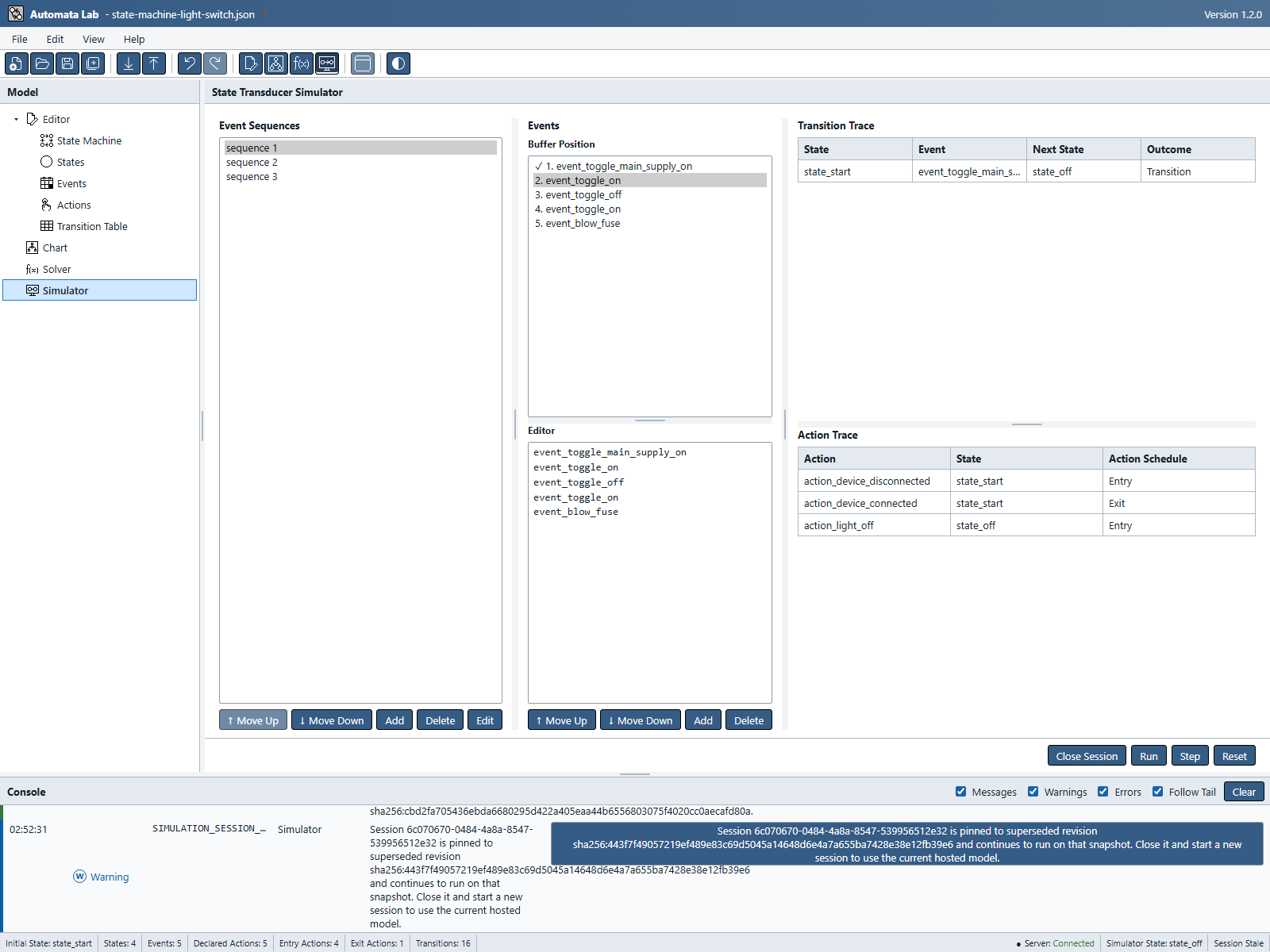
Each Simulator session captures one immutable hosted snapshot and semantic revision when it starts. A later semantic Push does not mutate that session. Instead, the session becomes stale and continues to operate on its pinned model and traces.
Reset also stays on the pinned snapshot. To use the newest hosted model, close the old session and create a new one. A Push that changes only Chart data or saved sequence libraries keeps the same semantic revision and does not stale the session.
Disconnecting does not by itself stale or close a session because the worker remains alive. Reconnecting may recover the same session. Worker recreation invalidates it completely because the new instance has no prior session repository.
Figure UG-22 shows the stale-session warning after a semantic Push.
Previous: Solver
Next: Simulator